PNG to Vector: Convert PNG Files to Real Vector Graphics
What "vector" actually means, which file format you need, and how to turn any PNG into a clean, scalable SVG - free, online, no signup.
"PNG to Vector" - What That Search Actually Means
People who search for a way to turn a PNG into a vector are usually holding one of two jobs: make a pixelated logo scale cleanly at any size, or produce a file that a print shop, a cutting machine or a design tool will actually accept. Both jobs end at the same place - a real vector file - but the word "vector" hides two decisions: which format you need, and whether the conversion is genuine. If your file is ready right now, the free online PNG to SVG converterdoes it in under a minute; this guide covers everything around that step.
One definition before anything else. A true vector file stores shapes as mathematical paths - that is what vectorization actually does - and plenty of tools skip that step entirely and fake it. The fake is invisible until you zoom in or send the file to a machine.
The #1 failure mode: many "PNG to vector converters" never trace anything - they wrap your PNG inside an .svg file as an embedded bitmap. The result "scales perfectly" because it is still pixels in a trench coat. Open the output in a text editor: one giant base64 <image> tag instead of <path> elements means you got a renamed PNG, not a vector. Everything in this guide is about real tracing.
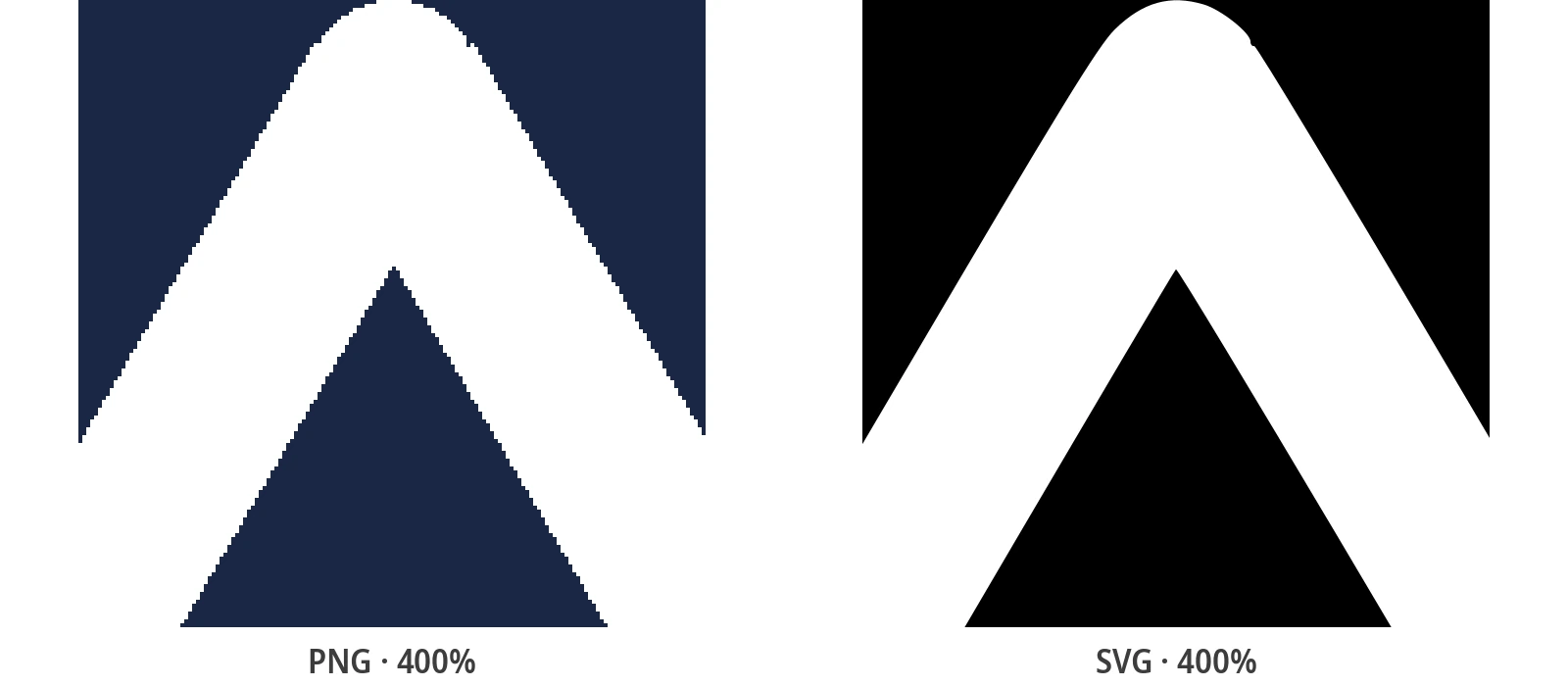
Risultati reali dal convertitore



What "Vector" Actually Means - and Which Format You Need
A PNG is a raster image: a fixed grid of colored pixels. It looks sharp at its native size and degrades the moment you enlarge it, because the file has no idea what the shapes are - only what color each square is. A vector graphic stores the shapes themselves as paths: edges, curves and fills defined by math, so the same file renders identically at 16 pixels and 16 metres.
"Vector" is a family, not a format. Four file types carry real vector paths, and they differ mainly in who opens them:
The Four Vector File Formats, Decoded
- SVG - the web standard. Opens in every browser and every design tool, and it is what cutting machines consume. This is what the converter outputs and the format this guide focuses on.
- EPS - the legacy print-shop format. Print vendors still ask for it regularly, and most vector editors export it on demand.
- AI - Adobe Illustrator's native format. Relevant when a designer takes the file over after you.
- PDF - carries vector paths too, and is what many print shops actually mean when they ask for a "print-ready" file.
How to Convert a PNG to a Vector Graphic for Free
No account, no install, no watermark. The whole conversion is four short steps:
- Upload the PNG - drag and drop it into the converter. PNG, JPG, BMP and WebP all work the same way.
- Pick a preset - Black & White for logos and line art, Poster for flat-color graphics, Photo for images with gradients and shading.
- Fine-tune if needed - color count and path detail trade file size against fidelity, per image.
- Download the SVG - real <path> elements, ready for the web, print or a cutting machine.
Under the hood the conversion runs an auto-tracing engine derived from VTracer, the open-source Rust tracer: your shapes are rebuilt as vector paths, not wrapped. That single sentence is the difference between this and half the results in the SERP.
Getting a Good Conversion: What Decides the Result
Tracing quality depends more on the input than on the tool. Clean sources convert almost perfectly; messy ones need two minutes of judgment. Three things decide the outcome:
- Flat colors vs gradients - a flat-color logo traces beautifully because each color region becomes a clean vector shape. A photograph traces into many small shapes and can look painterly; that is what the math is actually seeing.
- Preset choice - Black & White collapses the image to a crisp silhouette (ideal for logos and text), Poster keeps a limited palette, Photo preserves gradients at the cost of more paths and a larger file.
- Detail vs size - more path detail means closer fidelity and more kilobytes. A navbar logo wants fewer paths; a print file wants maximum fidelity.
Logos deserve the special mention: letterforms and brand marks are exactly what tracing is best at, and the guide to vectorizing a logo properlycovers the settings that keep edges crisp at small sizes.
PNG to EPS or AI: Use SVG as the Pivot Format
The converter outputs SVG - deliberately, because SVG is the format everything else accepts. If a print shop asked for EPS, or a designer needs AI, the route is: convert the PNG to SVG, open the SVG in Inkscape (free) or Illustrator, and save or export to the requested format. The paths survive the trip untouched, and it adds under a minute to the job. There is no direct PNG-to-EPS conversion here by design: one well-supported output format beats three mediocre ones.
Do not expect the reverse to be safe: rasterizing a vector back to PNG throws the geometry away for good. Keep the SVG as the master file and export PNG copies at whatever sizes a project needs.
Where a PNG-to-Vector Conversion Actually Pays Off
Not every image should become a vector - photographs that only ever display as photographs usually stay raster. But four situations repay the conversion immediately:
- Logos and brand marks - one file, every size, from favicon to storefront sign, with no pixelation ever again.
- Print work - business cards, stickers, apparel: print shops scale vectors freely and cut them without backgrounds.
- Cutting machines - Cricut, Silhouette and laser cutters follow vector paths, not pixels. Once traced, the file is ready for Cricut or laser cutting and the machine does the rest.
- Icons and UI assets - crisp on every screen density, and often smaller than the PNG they replace.
The common thread: if the image must scale, be cut, or be edited shape by shape, it wants to be a vector.
Stay PNG or Go Vector? The Five-Second Decision
Same rule of thumb every time. Left column, keep the PNG and skip the work; right column, convert - it takes less time than deciding.
| Stay with PNG when… | Convert to vector when… |
|---|---|
| A photo displayed at one fixed size | A logo that appears at many sizes |
| A banner optimized for one screen size | Artwork going to print or vinyl cutting |
| Complex photography with no scaling needs | An icon that must stay crisp on any display |
| Thumbnails where every byte counts | Line art, text and flat-color graphics |
When in doubt, convert one file and zoom to 800% - the SVG stays sharp exactly where the PNG turns into squares. The full performance and SEO trade-offs live in the SVG vs PNG for the webcomparison.
Related Conversion Guides
Vector theory, logos, cutting machines - the deep dives.
Frequently Asked Questions
Is a PNG a vector file?
No. PNG is always a raster format: a fixed grid of pixels with a set resolution. Renaming a PNG to .svg does not change that - and neither does embedding it in an SVG wrapper. To get a real vector, the image has to be traced so its shapes are rebuilt as paths.
How do I convert a PNG to vector for free?
Use the free online converter: upload the PNG, pick a preset, download the SVG - no account needed. If you work offline, the free desktop app does the same conversion locally on Windows and Linux, with unlimited single-file conversions.
Can I convert a PNG directly to EPS or AI?
Not in one step, and be suspicious of tools that claim to. The reliable route is PNG → SVG → EPS/AI: convert here, open the SVG in Inkscape or Illustrator, and export to the format you need. The vector paths pass through unchanged.
Why does my "converted" file still look pixelated?
Because it was never converted - it was embedded. Some tools wrap the PNG inside an .svg file as a base64 <image> tag instead of tracing it. Open the file in a text editor: if you see one huge blob of encoded data and no <path> elements, you are still looking at your PNG. Re-run it with a tool that outputs real traced paths.
Does converting a PNG to SVG remove the background?
Partly by design: with the Black & White preset, only the traced shapes become paths, so the flat background simply is not part of the output - useful for logos on transparent backgrounds. That is not the same as photo-subject cutout, which the converter does not do; the Photo preset keeps the whole scene.
Convert a PNG to Vector Now - It's Free
Upload a PNG, pick a preset, download a real vector SVG in under a minute - no account, no watermark, no strings.
Supporta lo Sviluppo Open Source
PixelToPath è gratuito. Se questo strumento ti ha aiutato a risparmiare tempo, considera di offrirmi un caffè.
❤️ Dona tramite PayPal